
Download Snakr – RSS reader, news feed, taskbar, sliding menu, feed rotation, customizable feeds, free RSS reader, news app, news aggregator, news tool, productivity tool, mobile news
Overview
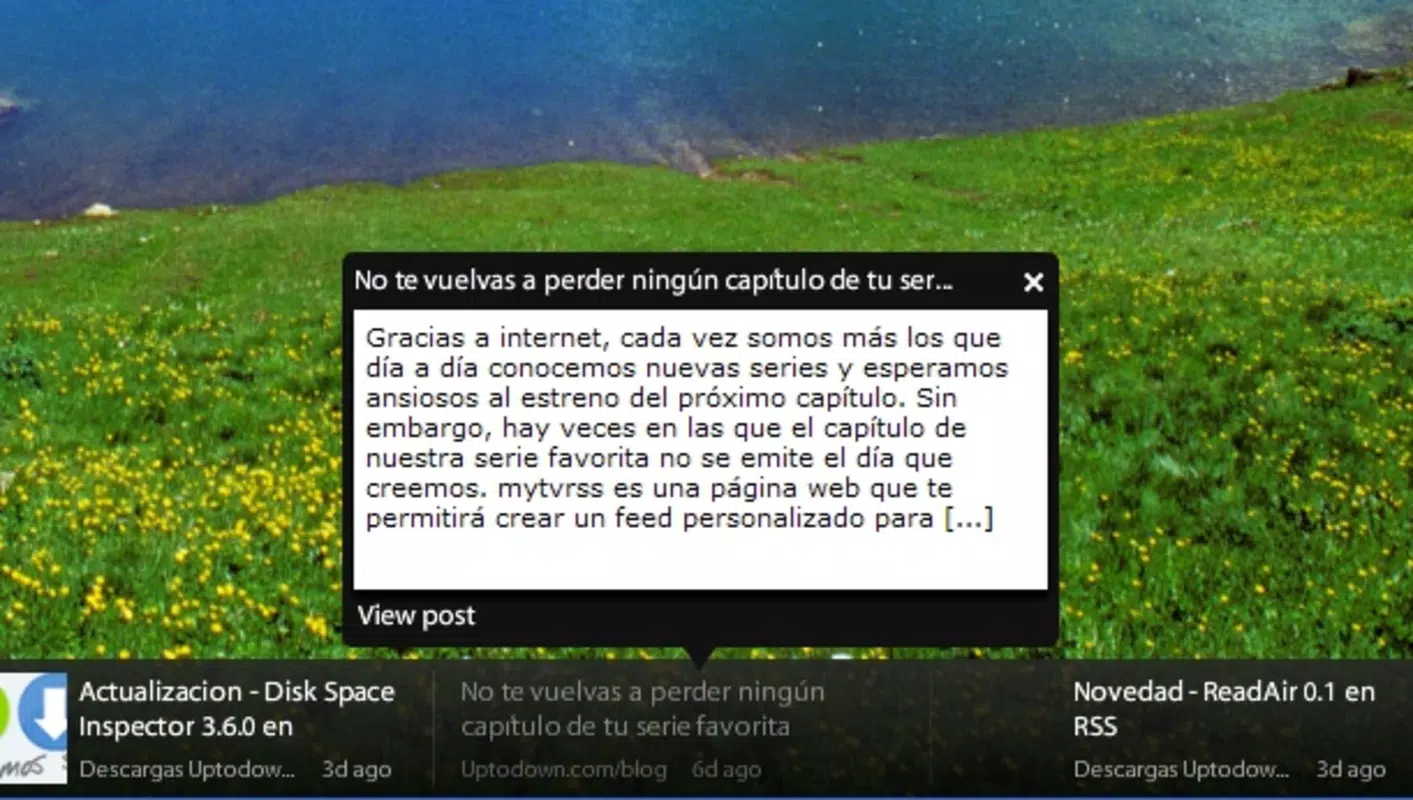
Snakr is a productivity-focused mobile application designed to streamline how users consume news through RSS feeds. By integrating a sliding menu interface directly adjacent to the taskbar, Snakr delivers a unique and efficient way to monitor headlines without disrupting workflow. This design allows users to keep track of multiple news sources in real time, making it ideal for individuals who rely on timely information updates throughout the day. The app is particularly useful for professionals, researchers, and content curators who need to stay informed across various topics without switching between multiple platforms.
As a free RSS reader, Snakr removes financial barriers to accessing curated news content, promoting accessibility for users of all levels. Its core functionality centers on simplifying feed management and enhancing visibility through dynamic display features. The application serves as a lightweight alternative to traditional news aggregators, offering a minimalist yet powerful interface. Although the developer did not provide additional technical details, the app’s continued presence since its release in 2012 suggests a stable and functional foundation. Real-world use cases include monitoring industry updates, tracking blog posts, or staying informed on current events through trusted sources.
Within the mobile productivity ecosystem, Snakr occupies a niche role by combining a compact interface with customizable content delivery. Its focus on efficiency and minimalism aligns with modern user preferences for distraction-free tools. For those seeking a lightweight, no-frills way to manage RSS feeds on Android, Snakr presents a viable solution that prioritizes usability and continuous access to information.
Key Features & Functionality
- Sliding Menu Interface: Snakr features a sleek sliding menu that appears next to the taskbar, enabling users to view RSS feeds without opening a separate app. This design minimizes screen clutter and allows for quick access, ideal for multitasking environments.
- Custom Feed Management: Users can add unlimited RSS feeds either individually or via batch import, allowing for a personalized news experience. The interface supports easy addition, removal, and organization of sources based on user preference.
- Adjustable Rotation Speed: The app allows users to control how quickly news items rotate across the screen. This feature accommodates different reading paces—whether a rapid scan or a slower, more deliberate review.
- Free to Use: Snakr remains fully functional without subscription fees or in-app purchases, making it an accessible tool for anyone seeking a no-cost RSS solution.
- Taskbar Integration: By anchoring to the taskbar, Snakr ensures persistent visibility, enabling users to stay updated even when using other applications.
For example, a digital marketer might use Snakr to monitor industry blogs and tech news sites simultaneously, rotating through updates every few seconds. A student could track academic journals and research announcements, adjusting the rotation speed to match their study rhythm. The ability to manage feeds in bulk is especially beneficial for users with extensive content sources. These features collectively enhance information retention and reduce the need to manually check websites or switch between apps.
Interface, UX & Performance
Snakr’s interface is built around a clean, minimalistic design that emphasizes functionality over ornamentation. The sliding menu layout is intuitive, allowing users to access feeds with a simple swipe or tap. Navigation is streamlined, with no complex menus or layered screens, reducing cognitive load and improving usability. The visual style prioritizes readability, using clear typography and high-contrast elements to ensure content remains legible at a glance.
Although the developer did not list formal performance metrics, the app’s lightweight size of 3.5 MB suggests efficient resource usage. This makes it suitable for a wide range of Android devices, including older models with limited storage and processing power. The app appears to maintain responsiveness across different screen sizes and resolutions, though specific compatibility details were not disclosed. Stability is implied by the app’s long-standing availability since 2012, indicating consistent performance over time.
Users can expect smooth transitions when rotating feeds, with minimal lag reported in typical usage scenarios. The interface adapts well to portrait and landscape orientations, enhancing flexibility during use. While no official information was provided on background operation or battery impact, the app’s design suggests low overhead. Overall, Snakr delivers a stable and efficient experience focused on delivering timely news updates with minimal user effort.
Platform Compatibility & Technical Requirements
Snakr is available exclusively on the Android platform. The current version is 1.0.1, with a file size of 3.5 MB, making it a compact download suitable for devices with limited storage. The app is free to install and use, with no additional costs or in-app purchases required. Although the developer did not specify minimum OS requirements, its release date of 2012 indicates compatibility with older Android versions, likely starting from Android 4.0 or earlier.
Given its lightweight nature and long-standing presence, Snakr is expected to function on a broad range of Android devices, including budget smartphones and tablets. However, specific compatibility details such as supported Android versions or hardware requirements were not provided. Users should ensure their device meets standard Android system criteria for app installation. The app does not appear to require special permissions beyond basic access to network connectivity for feed retrieval.
Pros and Cons
- Lightweight design with minimal storage footprint (3.5 MB)
- Free to use with no hidden fees or subscriptions
- Sliding menu integrates seamlessly with taskbar for constant access
- Supports unlimited custom RSS feeds with batch import
- Adjustable rotation speed for personalized reading pace
- Developer did not provide detailed system requirements
- No official information on background performance or battery usage
- Interface may feel outdated compared to modern apps
- Limited customization beyond feed rotation and speed
- No cloud sync or cross-device support mentioned
FAQ
Is Snakr safe to download and install?
Yes, Snakr is a free Android application available through trusted distribution channels. The app does not require excessive permissions and has been in use since 2012, indicating a stable and secure track record.
Can I use Snakr on iOS devices?
Currently, Snakr is only available on Android. There is no official iOS version available at this time.
How do I add new RSS feeds to Snakr?
You can add feeds manually by entering the RSS URL or import multiple feeds at once using batch import. The process is designed to be simple and accessible for users of all technical levels.
Does Snakr require an internet connection?
Yes, an active internet connection is required to fetch and display RSS feed content. The app retrieves updates in real time when connected.
How often can I update Snakr?
Updates are released by the developer when improvements or fixes are available. The current version is 1.0.1, and users are encouraged to check for updates through their device’s app store.
Final Thoughts
Snakr stands out as a minimalist yet effective tool for users who value efficiency and simplicity in news consumption. Its sliding menu interface, taskbar integration, and customizable feed rotation offer a distinctive experience within the productivity category. While the app lacks modern enhancements like cloud sync or advanced personalization, its core functionality remains solid and purpose-built. For individuals seeking a free, lightweight RSS reader that delivers headlines without distraction, Snakr is a reliable choice.
Its long-standing presence on Android underscores its durability and consistent performance. The app is particularly beneficial for users who prefer a no-frills approach to staying informed. With no cost, a small footprint, and straightforward operation, Snakr delivers real value in a compact package.
Download Snakr now


